Performance is a design feature
Speed is not a clean-up task after the interface is finished. It is a chain of decisions about content, imagery, fonts, motion and code from the first design.
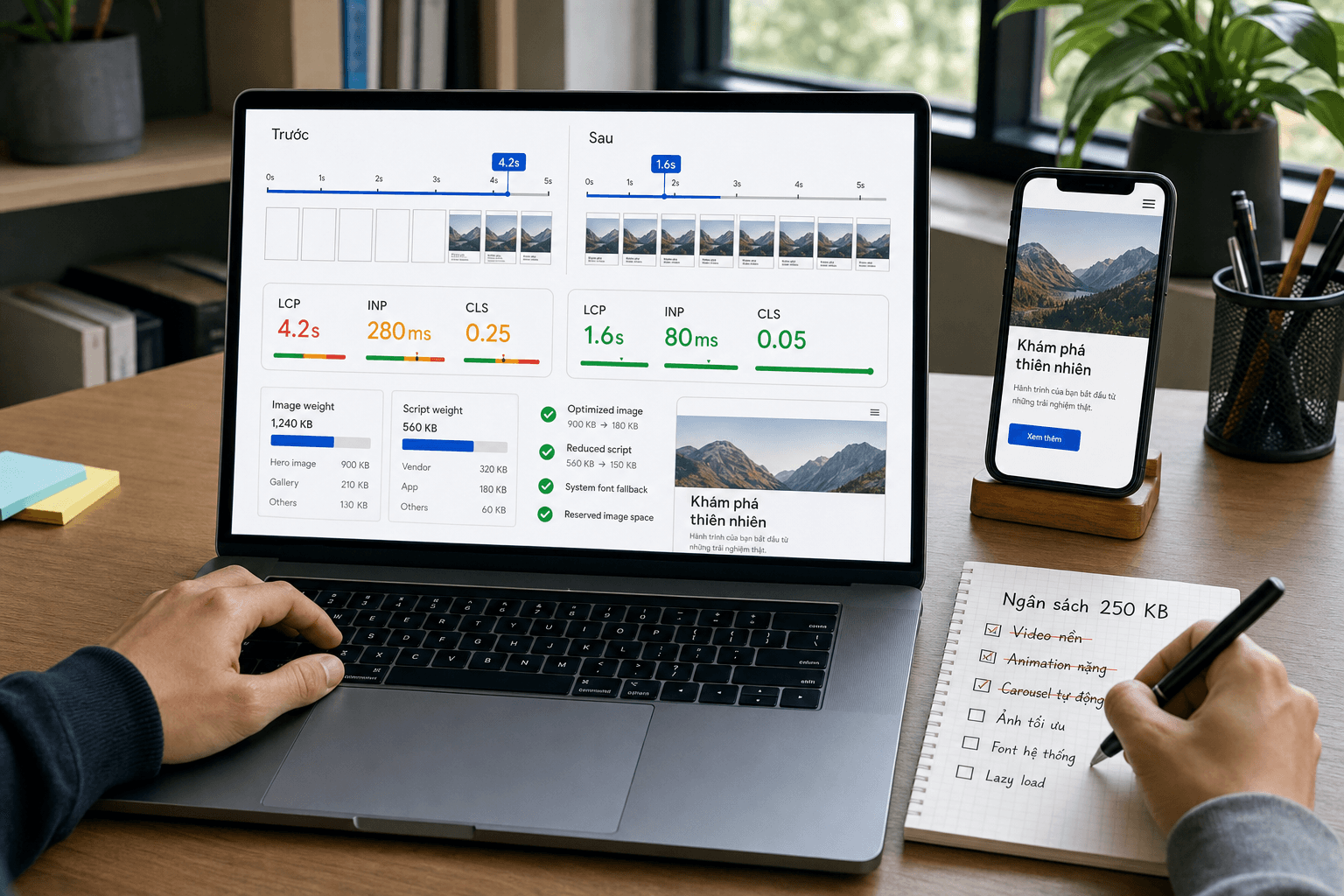
People do not separate interface from speed. They experience whether the main content appears in time, whether a button responds and whether the page moves just as they try to tap.
Performance cannot be left for a final optimisation pass. By then, images, fonts, motion and page structure have become brand decisions, making heavy choices much harder to revisit.
1. Translate metrics into experience
Core Web Vitals provide shared language for three perceptions: whether the main content appears in time, whether interactions respond and whether the layout remains stable. Current good thresholds are LCP at or below 2.5 seconds, INP at or below 200 milliseconds and CLS at or below 0.1, evaluated at the 75th percentile.
The numbers become useful when tied to a screen and action. LCP on a product page is often the hero image or heading; INP may come from a filter running too much script; CLS appears when late media or fonts move the button a person was about to use.
- LCP: when the main content becomes visible, not when every resource finishes.
- INP: the response delay people experience across a visit.
- CLS: unexpected movement of content already in view.
2. Set a budget before choosing the solution
A performance budget is an intentional constraint: hero image weight, total JavaScript, font files or a time target on a representative device and network. It makes trade-offs concrete. If a background video is added, what moves out or loads later?
There is no universal number for every site. Choose three to five important page types, measure the current product or a strong reference, and set a budget tight enough to influence decisions.
- Homepage: first content and the path to its primary action.
- Listing: response while filtering, sorting and paging.
- Detail: primary media, variants and add-to-cart interaction.
- Form: typing, validation and feedback after submission.
A budget only works when it is checked during builds or before release. A number in a document that blocks no decision is only a preference.
3. Five design decisions that directly affect speed
Many performance problems begin with an unconstrained visual decision rather than a single slow function. A 4K hero video, six font styles or scroll-driven animation all carry loading, processing and stability costs.
Good design does not mean removing every motion or using tiny images. It decides where impact matters, where response must be immediate and spends the budget accordingly.
- Images: choose crop, display size, format and compression before CMS upload.
- Typography: reduce families and weights; preload only files needed above the fold.
- Layout: reserve space for images, embeds and asynchronous content.
- Motion: favour transform and opacity, pause off-screen work and respect reduced motion.
- Third parties: load chat, heatmaps or advertising only when their value outweighs their cost.
4. Measure in the lab and in the field
Lighthouse and developer tools reproduce issues under controlled conditions, making them useful for finding oversized media, main-thread work and missing dimensions. One run, however, cannot represent every device, network or behaviour.
Field data such as Chrome UX Report or real-user monitoring shows the 75th-percentile experience over time. Use lab data to diagnose and field data to decide which problem deserves priority.
- Measure by page type and device, not only a site-wide average.
- Track before and after major interface, content or third-party changes.
- Store context with the value: release, network, device, URL and time.
5. Put performance into the team's routine
During discovery, identify important pages and behaviours. In design, specify assets, loading states and reserved space. During development, enforce budgets automatically. Before release, test on a real device; after release, watch user data.
Most importantly, give the decision an owner. When a metric regresses, the team needs someone empowered to delay a marketing script, request a smaller asset or change presentation instead of leaving the problem between design, engineering and content.
The goal is not a perfect score in every tool. The goal is to keep important experiences fast and stable while content, campaigns and the product continue to change.
Pre-release performance checklist
- The LCP element and its loading path are known for each page template.
- Images use appropriate dimensions, aspect ratio, format and compression.
- Fonts include only the families and weights that are actually used.
- Images, embeds and late content all reserve their layout space.
- Primary interactions have been tested on a mid-range mobile device.
- Every third-party script has an owner and a clear business reason.
- There is a lab baseline before release and a plan for field monitoring.